
Subtitle: How to serve 10,000 users without the "Cloud Bill Panic."
1. The Success Trap
It’s the dream and the nightmare: You hit #1 on Product Hunt. Your traffic spikes. Your "Physical SaaS" dashboard is glowing with real-time hardware data. But then, you check your dashboard and realize you’ve burned $400 in OpenAI tokens and Vercel usage in 48 hours.
In 2026, Efficiency is a Feature. If your SaaS infrastructure cost grows linearly with your user base, you don't have a business; you have a high-interest loan. This post is about building a Low-Burn Architecture—a strategy to keep your total monthly spend under $100 while scaling to 10,000+ users.
Takeaway: You want growth in users, not growth in burn rate.
2. Strategic Data Tiering: Hot vs. Cold
Storing every single telemetry packet or AI log in a managed Postgres database (like Supabase or Neon) is a rookie mistake. In 2026, storage is cheap, but managed relational storage is expensive.
The 2026 Strategy: The R2 "Icebox"
- Hot Data (Postgres): Store only what is absolutely necessary for the current session—User profiles, billing state, and the last 24 hours of hardware telemetry.
- Cold Data (Cloudflare R2): Every 24 hours, run a background job that exports old logs and telemetry to Cloudflare R2.
One minimal pipeline looks like this: Postgres (last 24h) -> daily export job -> R2 (Parquet files) -> ad-hoc analytics with DuckDB running in a worker or notebook. At the 10k-user level, this means you are paying for “object storage + occasional compute” instead of a full-blown warehouse or oversized managed database.
Why R2? Unlike Amazon S3, R2 has zero egress fees. In 2026, we use Parquet files on R2. Parquet is a columnar format that allows you to run high-speed analytical queries (using DuckDB) directly on your "cold" files without ever moving them back into a database.
Result: You keep your Postgres DB tiny, fast, and within the free or $29/mo tier indefinitely.
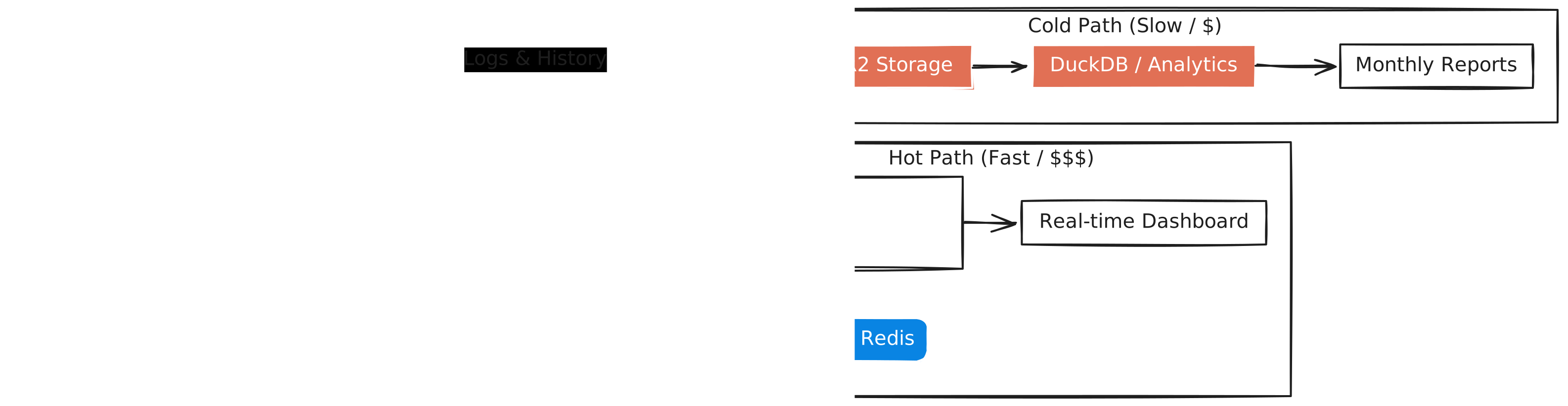
Figure 1: The Dual-Path Architecture. By separating high-frequency state from historical logs, we minimize database costs while retaining full analytical power.
Takeaway: Target a hot Postgres dataset that comfortably stays under a low-tier plan, and push everything else to cheap, analytical cold storage.
3. Hybrid Inference: Intelligence for Pennies
Calling GPT-4o or Claude 3.5 for every single task is financial suicide. In 2026, we use Model Tiering.
The Inference Decision Tree:
- Semantic Cache (First Priority): Use Upstash Redis. If a user asks a question that has been asked (semantically similar) in the last hour, serve the cached response. Cost: $0.0001.
- The "Workhorse" (80% of tasks): For summarization, data formatting, or simple hardware diagnostics, use a smaller model like Llama 3 (8B) or Mistral via Groq. Groq’s speed in 2026 is legendary, and the cost is a fraction of the frontier models.
- The "Brain" (Final 20%): Only trigger GPT-4o or Claude 3.5 for complex reasoning or final high-stakes output.
A simple routing heuristic can look like this:
- If
task_type in {summary, classification, formatting}andinput_length < X→ send to the Groq “workhorse” model. - Else if
task_type in {Q&A, diagnosis}andcomplexity_score < T→ still use the workhorse. - Else → send to the “Brain” model and optionally cache the result semantically.
You also need a cache invalidation rule: for example, expire semantic cache entries after N minutes or when you roll a new model/embedding version.
Takeaway: 80% of user-visible “intelligence” can ride on cheap, small models plus caching—reserve frontier models for moments that actually move revenue or risk.
4. Edge Offloading: Stop Paying for "Idle"
Serverless functions are great, but "execution time" adds up. In 2026, the elite move is Aggressive Edge Offloading.
- Move to Edge: Authentication, Feature Flags, and Request Routing should live in Vercel Edge Functions. They have no cold starts and are significantly cheaper for high-frequency hits.
- The Ingest Trick: As discussed in my Physical SaaS post, don't write to the DB for every hardware ping. Aggregate 100 pings in an Edge Function buffer and do one batch write.
Math check: 100 writes/sec = $$$$. 1 batch write every 10 seconds = pennies.In practice, collapsing from thousands of writes per minute down to a few batched writes per minute often cuts your write-related costs to a fraction of the original, while keeping connection counts and lock contention in a safe zone.
Takeaway: Push high-frequency, low-value operations to the edge and batch them until your database only sees what truly matters.
5. The "Coolify" Exit Strategy
Managed platforms (Vercel, Supabase) are worth the premium for your Core UI and Main API because they provide the best Developer Experience (DX).
However, for "the grind"—long-running cron jobs, heavy data processing, or scraping—move to a self-hosted VPS using Coolify.
- The Setup: A $20/mo Hetzner or DigitalOcean VPS running Coolify.
- The Role: It handles all the background workers that don't require the "Edge" speed. This keeps your Vercel bill focused strictly on the user-facing experience.
When should you consider this exit? A simple rule of thumb:
-
If your scheduled jobs are running more than X compute hours per month on serverless, or
-
If you introduce your first heavy ETL/scraper that runs daily or continuously,then it's time to move that workload to a Coolify-managed VPS and keep the “nice DX” layer just for the core product.
Takeaway: Keep DX where it affects the user; move grind work to cheap, boring servers.
6. Monitoring the "Burn"
In 2026, the most important metric for a solo builder isn't DAU (Daily Active Users); it’s **CPAU (Cost Per Active User).**CPAU is your real-time health check on whether Efficiency is still a Feature in your architecture.
You should have an internal dashboard tracking:
- Tokens per User/Day
- DB Operations per User/Day
- Edge Invocations per User/Day
The Goal: Keep your CPAU below $0.01 per day. At 10,000 users, that’s $100/day—but with the tiering strategies above, you can often push that down to $0.003, keeping your profit margins healthy.
Target: Design for CPAU ≈ $0.003–$0.01/day at 10,000 users; if it drifts up, you know exactly which levers to pull—tokens, DB, or edge.
Takeaway: If you can’t see your CPAU in a dashboard, you’re flying blind.
7. Summary: Profitability is an Architectural Choice
A "Lean SaaS" is not about being cheap; it’s about being precise. By tiering your data, your intelligence, and your compute, you ensure that your project can survive the "Product Hunt Spike" and turn it into a sustainable business.
Don't let a $2,000 cloud bill kill your momentum. Build for the scale you want, but pay for the scale you have.Efficiency is a Feature—and architecture is where you decide whether you get to keep it.
Next Step: Now that we’ve mastered cost control, we need to talk about the physical reality of scaling hardware. In Part 7, we’ll explore Fleet Management at Scale—how to manage 1,000+ physical devices globally without losing your mind,and how the “physical cost” of those devices dovetails with the cloud cost model in this post.