
Subtitle: Why I finally moved my hardware-architect brain from VS Code to an AI-Native IDE, and how it redefined my productivity stack.
1. The IDE Extinction Event
For a decade, the recipe for a perfect development environment was simple: VS Code + a handful of extensions. But in 2026, we’ve hit a wall. Traditional editors with AI "bolted on" as plugins are no longer enough. We are witnessing an extinction event for "dumb" editors.
The question isn't just about code completion anymore; it's about Context Sovereignty. Today, we look at the two titans of the era: GitHub Copilot, the incumbent giant, and Cursor, the AI-native disruptor.
2. The Comparison Matrix (At a Glance)
Before we dive deep, here is the high-level breakdown of how these two giants stack up in a real-world production environment.
| Feature | GitHub Copilot (2026) | Cursor (AI-Native IDE) |
|---|---|---|
| Core Philosophy | Assistant inside an Editor | AI-First Development Environment |
| Context Awareness | Local (Open Files + Snippets) | Global (Full Repository Indexing) |
| Primary Workflow | Tab-to-Complete | Multi-file "Composer" Instructions |
| Model Choice | OpenAI (Locked) | Claude 3.5, GPT-4o, Local LLMs |
| Best For | Enterprise/Corporate Teams | Solo Founders & Sovereign Creators |
3. Deep Dive: Context is King (@Codebase)
If you followed my previous 10-part series on Physical SaaS Architecture, you know that modern apps are complex. You have firmware logic, API routes, and edge functions all talking to each other.
The Problem with Copilot
Copilot often feels like a "local" thinker. It looks at your open files and tries to guess. If you ask it to fix a bug in your database schema that originated in a hidden utility file three folders away, it often hallucinates.
The Cursor Solution: RAG-on-the-Fly
Cursor indexes your entire repository using Retrieval-Augmented Generation (RAG). When I type @Codebase, it doesn't just guess; it performs a semantic search across my entire project.
Real-world Example: I asked Cursor: "Why is my HMAC validation failing on the ESP32 heartbeat?"
Cursor immediately pulled the
auth.tsutility, thedevice-gateway.tsroute, and theconfig.hfile from the firmware folder. It realized the salt was missing a trailing character in the firmware—something Copilot never would have found because the firmware folder wasn't "open."
4. The "Command Center" Strategy
AI-native development isn't just about writing functions; it's about managing your entire OS as a productivity weapon. While Cursor owns the code, I need something that owns the Workflow.
Enter Raycast: My Global AI Glue
I don't let my IDE handle everything. I use Raycast as my global AI Command Center.
While I'm researching a new API in the browser or looking at a raw JSON log in my terminal, I don't want to copy-paste it into my IDE. With Raycast AI, I can:
- Explain Errors: Highlight a terminal error and hit a shortcut to diagnose it instantly.
- AI Snippets: Generate a complex SQL query or a Bash script without ever opening a code editor.
- Floating Notes: Keep AI-generated architectural notes visible while I switch between Cursor and my browser.
Check out Raycast here to see how it bridges the gap between your IDE and your business operations. It’s the single most important tool in my "Empire of One" arsenal.
5. Interaction Paradigms: Tab vs. Composer
This is where the productivity gap becomes a canyon.
GitHub Copilot: The "Ghost Text" Master
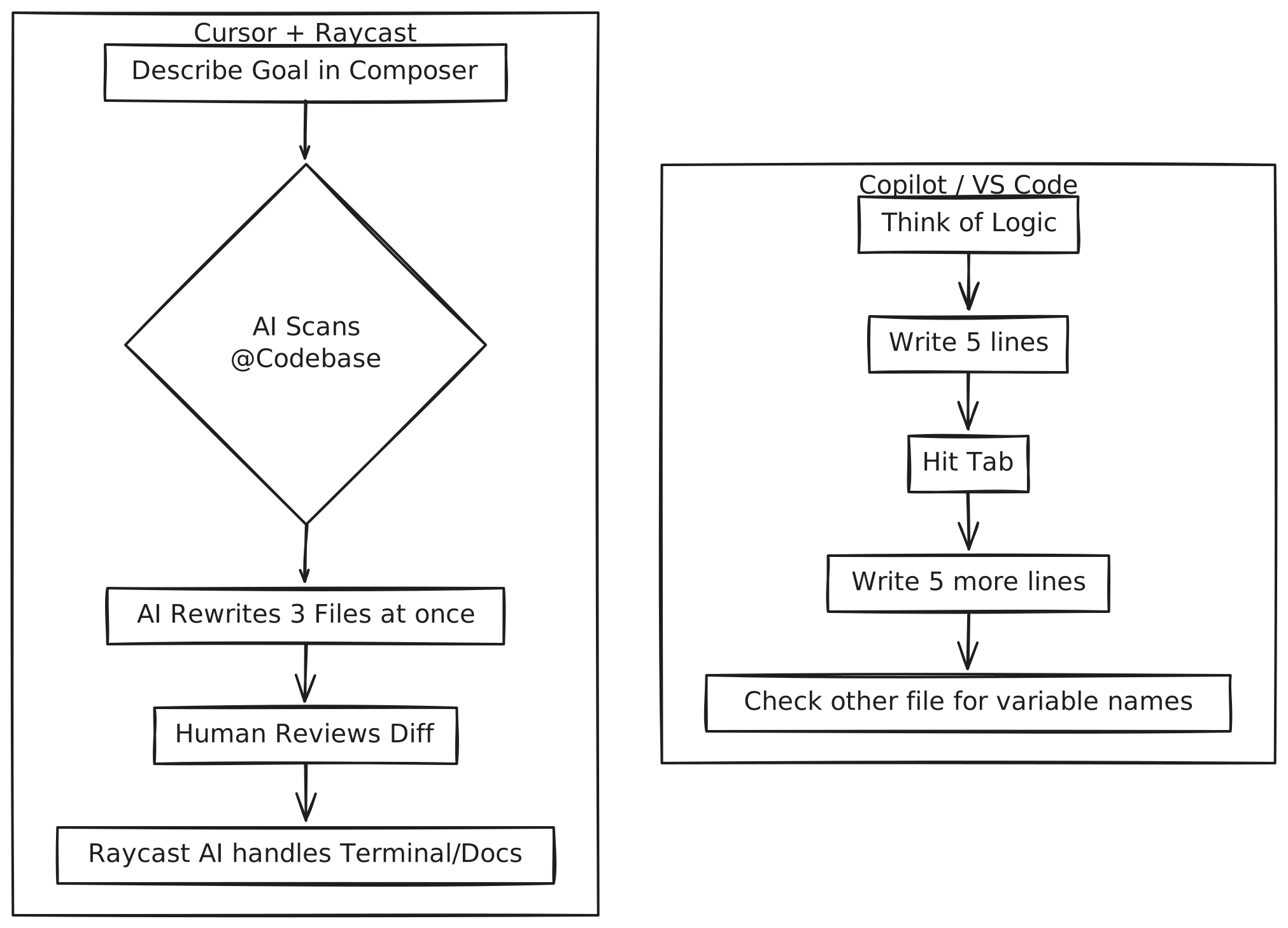
Copilot is the king of "Autofill." You start typing, it predicts the next line, you hit Tab. It’s great for boilerplate, but it’s incremental. You are still the one driving; it’s just finishing your sentences.
Cursor: The "Composer" Revolution
Cursor’s Composer (Cmd+I) is a radical departure. You stop writing lines and start writing Intentions.
- Instruction: "Refactor the entire billing flow to use LemonSqueezy instead of Stripe, and update the UI components to reflect the new pricing tiers."
- Action: Cursor doesn't just suggest code; it opens 5 different files, deletes the old logic, writes the new logic, and shows you a diff for all of them simultaneously.
6. Visualizing the Productivity Gap
7. The Final Verdict: Which should you choose?
In 2026, the choice is clear based on your role:
- Choose GitHub Copilot if: You work in a high-security corporate environment with 100+ developers. Its integration with GitHub Actions, Enterprise security, and Microsoft's ecosystem makes it the "safe" standard for big teams.
- Choose Cursor if: You are a Solo Founder, Indie Hacker, or Architect. If your goal is to build a $1M business with zero employees, you need the speed that only an AI-native IDE can provide.
My Personal Setup:
- IDE: Cursor (Pro Plan, Claude 3.5 Sonnet)
- OS Command Center: Raycast Pro
- Terminal: Warp (AI-Integrated)
Summary: Stop Typing, Start Architecting
The tools of 2026 are about removing the "boring" parts of creation. Whether it's the repository-wide intelligence of Cursor or the global OS-level speed of Raycast, the goal is the same: Focus on the problem, not the syntax.